
Foodsage vs. Fig App: Which Food Scanner Fits Your Diet?
Foodsage vs Fig App compared: how each scanner builds your profile, what it flags, what it costs, and which is the stronger fit for checking inflammatory ingredients.
Quick answer: Fig is the broader scanner, with thousands of diet and allergy options, store and restaurant search and profiles for several people. Foodsage is narrower and deeper: it is built around inflammatory ingredients and chronic conditions such as celiac disease, IBD, Hashimoto's and lupus, and its verdict names the ingredients that matched. For checking inflammatory ingredients we think Foodsage is the stronger fit, and for a family with many different diets Fig may suit better. Both are free to download.
Foodsage is our app, so we have tried to describe Fig only from its own App Store listing and website, dated October 2026. The two apps overlap, and several people use both. This guide explains where they differ so you can choose.
At a Glance: Foodsage vs. Fig
| Foodsage | Fig | |
|---|---|---|
| Built for | Checking packaged-food ingredients against your conditions, sensitivities and avoid choices | Finding food that fits many diets and allergies, with store and restaurant search |
| How you set it up | Choose conditions, custom sensitivities and avoid categories | Answer a short questionnaire to build your Fig, and add profiles for other people |
| Conditions | Celiac disease, diabetes, IBD, Graves' disease, Hashimoto's, lupus, PCOS, multiple sclerosis, rheumatoid arthritis | Many diet and health filters, such as Low FODMAP, Low Histamine, GERD Friendly, PCOS Friendly and Low Iodine, per its website |
| Inflammation focus | Autoimmune mode; avoid categories include industrial seed oils, added sugars, artificial additives, nitrates and gluten grains | An Anti Inflammatory product filter and AIP recipe filter listed on its website |
| What a scan shows | A verdict plus the specific ingredients that matched your profile, with alternatives | A result showing how the product matches your selections, with ingredient detail via its Simplify feature, per its website |
| Extras | Meal and symptom log, health scores, personalized weekly meal plans | Store and restaurant browsing, shopping lists, recipes, profiles for several people |
| Cost | Free to download; in-app purchases including Premium | Free to download; optional Fig+ subscription (Restaurants, Multiple Figs, Unlimited Scans and more) |
How Fig Works
According to its App Store listing, Fig lets you check whether a product's ingredients are compatible with your diet in under a second using the barcode scanner. It names Low FODMAP, Gluten-Free, Vegan, Low Histamine and Alpha-Gal among the diets it supports, with 2,800+ other options. It lets you make a profile for everyone you care about, find foods that work for you at 100+ grocery stores and restaurants, and create shopping lists. Fig is free to download and use, and the optional Fig+ subscription unlocks Restaurants, Multiple Figs, Unlimited Scans and more.
Fig's website describes the same flow: a short questionnaire builds your personalized profile, and product filters include Alpha Gal Friendly, Anti Inflammatory, Candida Diet Friendly, Dairy Free, Gluten Free, GERD Friendly, Low FODMAP, Low Histamine, Low Iodine, Mediterranean Diet Friendly, MSG Free, PCOS Friendly, Pregnancy Friendly and more. Its recipe filters include AIP and Gut Friendly. Fig's own materials have described its range in different ways over time, including 25+ dietary categories in an earlier introduction post and 2,800+ options on the current listing, so treat the numbers as indicative.
Where Fig is strong
- Breadth: a very long list of diets and allergens in one app.
- Families and households: profiles for more than one person.
- Finding food: store and restaurant browsing, plus shopping lists.
- A quick barcode check; its listing says under a second.
How Foodsage Works
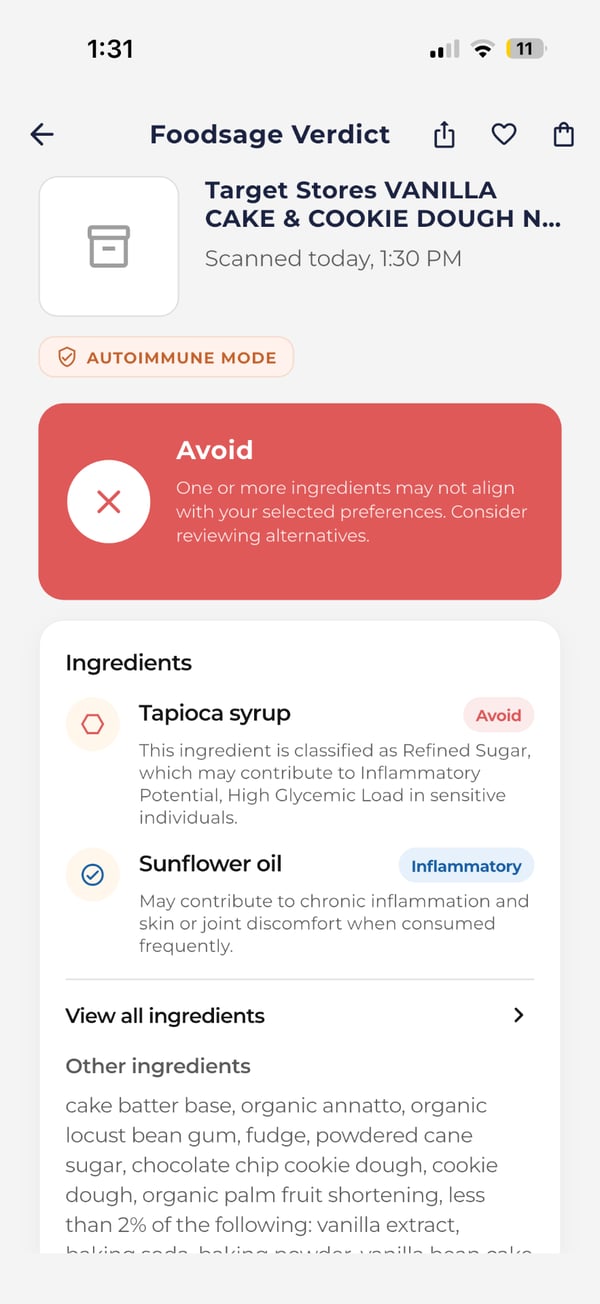
Foodsage is built around a different question: what in this packaged food matters for my condition or my goals? In setup you choose conditions (celiac disease, diabetes, IBD, Graves' disease, Hashimoto's, lupus, PCOS, multiple sclerosis or rheumatoid arthritis), add custom sensitivities (dairy, gluten, FODMAP, nightshade, lectin-related, nuts, shellfish or soy) and choose what to avoid: artificial additives and preservatives, industrial seed oils, added sugars and sweeteners, refined and processed starches, nitrates and nitrites, and gluten grains. A scan returns a verdict and the specific ingredients that matched, and the app suggests friendlier alternatives.
Where Foodsage is strong
- Inflammatory ingredients: the avoid categories, Autoimmune mode and the matched-ingredient explanation are the core of the app, not a filter among many.
- Chronic conditions: conditions are first-class choices, so the profile starts from your diagnosis, not only from a diet name.
- Tracking and planning: a meal and symptom log and personalized weekly meal plans, including AIP and PCOS-friendly options, sit in the same app.
For the evidence behind checking for these ingredients, and the limits of that evidence, see our anti-inflammatory diet guide. Foodsage highlights common inflammatory ingredients based on the profile you set up. It does not measure inflammation in your body.
Which Should You Choose?
- Choose Foodsage if you manage an autoimmune or digestive condition, or want to avoid inflammatory ingredients such as seed oils, added sugars and additives, and you want to see exactly which ingredients tripped a flag.
- Choose Fig if you need to cover many different diets and allergies, shop for a household with different needs, or want store and restaurant search.
- Use both if you want Fig's reach and Foodsage's condition-based check. Both are free to download.
If you have celiac disease, also read our Hashimoto's and celiac food scanner guide, and for how scanners compare in general, see how to choose an ingredient checker app and Foodsage vs. Yuka.
Read the Label Either Way
Neither app can test food or see cross-contact in a factory. For a serious allergy or celiac disease, read the package yourself, including any may-contain statement. Both apps read ingredient lists against the profile you set. Foodsage provides ingredient information to help you shop. It does not diagnose or treat any condition, and nothing here is medical advice.
Continue reading
- GuideFoodsage vs. Yuka: Which Food Scanner Fits Food Sensitivities?
- GuideYuka Alternatives for Food Sensitivities: 7 Apps Compared
- GuideHow to Choose an Ingredient Checker App (and What It Can't Do)
- Pillar guideAnti-Inflammatory Diet: What to Eat, What to Avoid and What the Evidence Shows
- GuideFood Scanner for Hashimoto's and Celiac Disease: What to Check and What to Know
Foodsage compared
How Foodsage stacks up against other food scanner apps.
Bring inclusive wellness benefits to your team.
MetricPoint gives employers a modern, everyday wellness benefit employees actually use.
Request Demo