
How to Choose an Ingredient Checker App (and What It Can't Do)
What ingredient checker apps do, how barcode and label scanning work, where they fall short, and 7 questions to ask before you pick one.
Quick answer: An ingredient checker app reads a product's ingredients from a barcode or a photo of the label and flags the ones you want to avoid. Choose one that checks your own triggers, not one score for everyone, shows why it flagged something and covers the products you buy. Still read the label yourself, especially for allergies.
Reading every ingredient list by hand gets tiring fast, especially when you are avoiding more than one thing. An ingredient checker app can take a lot of that work off your plate, but only if it answers the question you actually have in the aisle. This guide explains what these apps do, how the scanning works, where every app has limits, and what to ask before you pick one. It is general information, not medical advice.
What an Ingredient Checker App Does
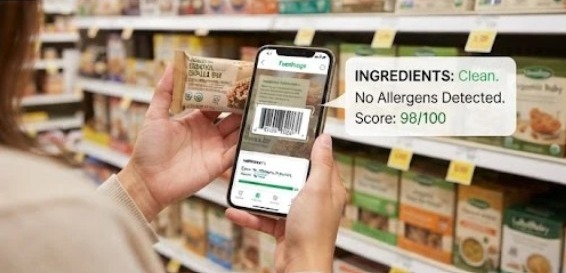
An ingredient checker app turns a product's ingredient list into a check against a set of rules. The difference between apps is mostly about whose rules they use.
- A general score — the app grades every product the same way for every user, usually based on nutrition and additives. It answers “is this a reasonable food?” We explain how one well-known score is built in Foodsage vs. Yuka.
- A personal check — you tell the app what you avoid (an allergen, ingredients linked to a condition, a clean-eating goal), and it checks each product against that profile. It answers “does this contain something I react to?”
Some apps also scan cosmetics, and the phrase “ingredient checker” is sometimes used for recipe tools that compare a recipe with your pantry. This guide is about packaged food.
How Ingredient Scanning Works
Most food scanner apps follow the same three steps, and each one can go wrong in its own way.
- Finding the product — the barcode is matched to a product database. That can be the app's own database or an open one such as Open Food Facts, a free nonprofit database built by volunteers.
- Reading the label — when the barcode is missing or the product is not in the database, many apps can read a photo of the ingredient list instead. How well that works depends on lighting, glare, curved packaging and small print.
- Matching — the list is split into individual ingredients and compared with the app's rules or your profile.
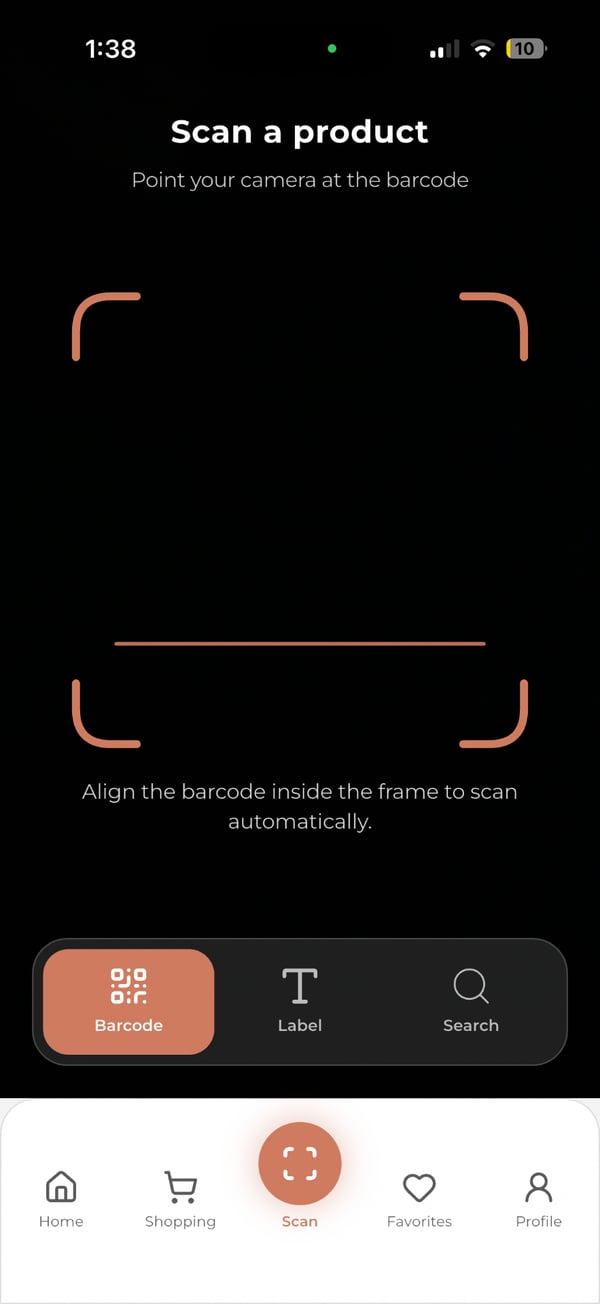
Errors creep in at each step: a product can be missing or out of date, a barcode can match the wrong item, and a photo can be misread. That is why the label in your hand stays the final word.
How Complete Are Product Databases?
Independent testing of food scanner apps is rare. One peer-reviewed study, published in Public Health Nutrition, scanned the barcodes of 100 products from the two largest Dutch supermarket chains with seven popular diet apps. The share of products each app identified correctly ranged from 96% for MyFitnessPal to 5% for SparkPeople. Where products were found, nutrient values were least accurate for sugar and protein, with 64% within 5% of the label.
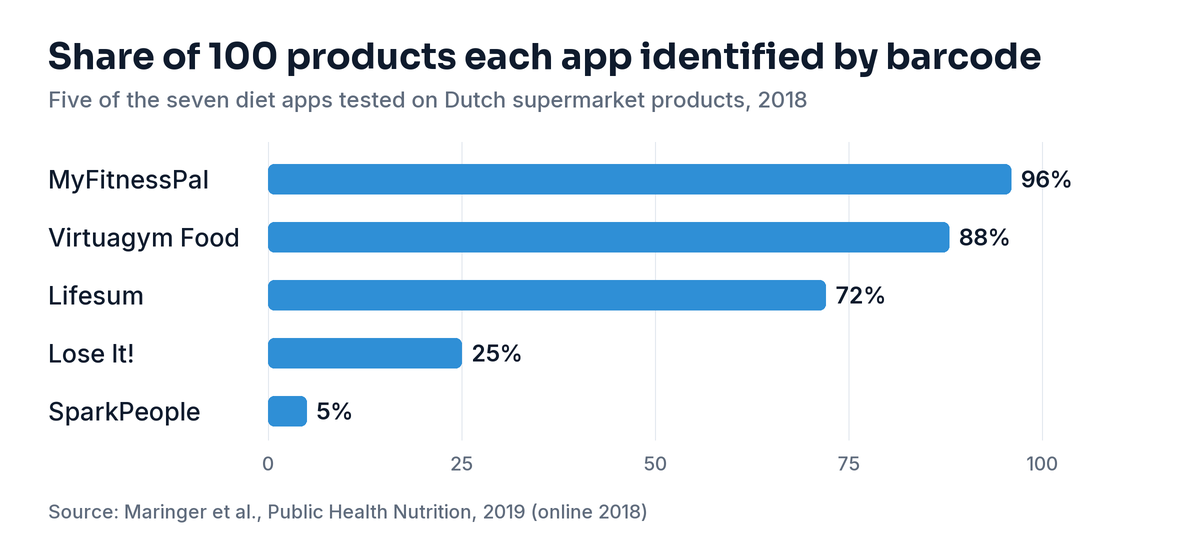
Keep the limits in mind: these were calorie-tracking apps rather than ingredient checkers, the products were Dutch, and the data is from 2018. The study does not tell you how any app performs today. What it does show is that database coverage can vary enormously from one app to the next, which is why testing an app on your own groceries matters.
What No App Can Tell You From a Label
Even a perfect scan can only report what is printed on the package or stored in a database. A few gaps are built into food labeling itself.
- “May contain” statements are voluntary — the FDA says precautionary statements such as “may contain” or “produced in a facility that also uses” are not required by law. FARE points out that a missing advisory label does not mean a product is safe.
- Recipes change — FARE warns that ingredients and manufacturing processes can change without warning, and advises reading the label every time you buy a food, even one you have bought before. A database entry can lag behind a new recipe.
- Some allergens hide in general terms — according to FARE, allergens that are not covered by the major-allergen laws, such as mustard, can be part of a spice or flavoring and appear only as a general term like “natural flavorings.”
- Only nine allergens must be named — US law requires milk, eggs, fish, crustacean shellfish, tree nuts, peanuts, wheat, soybeans and sesame to be declared. Sesame labeling took effect on January 1, 2023, and the FDA notes that some products already on shelves before then may not list it.
If you are not sure whether you are dealing with an allergy or an intolerance, our guide to food intolerance vs. allergy explains the difference. With celiac disease or a serious allergy, an app is a faster way to read a label, not a replacement for reading it. Our guide to hidden sources of gluten shows how much can depend on the fine print.
7 Questions to Ask Before You Choose
1. Does it check against your profile or give one score for everyone?
If you manage a condition, an allergy or a specific sensitivity, this is the deciding question. A product can earn a good general grade and still contain your trigger. Look for setup screens that ask what you avoid.
2. Does it cover your specific triggers?
The major allergens are the easy part. Check for the less common things you avoid, such as sulfites, FODMAP groups, nightshades or seed oils, and whether you can add an ingredient that is not on the app's list.
3. Does it show why it flagged something?
A verdict that names the matched ingredients lets you compare it with the label in seconds. A bare score or a red light leaves you guessing, and you cannot tell a real match from a misread word.
4. Can it read the label when the barcode fails?
Store brands, imported foods and newly reformulated products are the ones most likely to be missing or out of date in a database. An app that can read a photo of the ingredient list, or let you search, still works when the barcode does not.
5. Does it cover the products you actually buy?
Before you rely on any app, scan five products you already know well, including a store brand. Check that each one is found, that the ingredient list matches the package, and that the app flags what you expect.
6. Does it fit how you shop and eat?
Think about what you need beyond the scan: suggested alternatives when a product does not fit, meal plans built around your restrictions, a log of meals and symptoms, or support for more than one person in the household. Check the store listing for what is included.
7. What does it cost, and what happens to your data?
Many scanner apps are free to download with paid tiers, and trials end. A health profile is personal information, so read the privacy policy to see what the app collects and whether it is shared.
Where Foodsage Fits
Foodsage is our ingredient checker, built for people managing food sensitivities tied to autoimmune and chronic conditions, food allergies, or clean-eating goals. During setup you choose the conditions, sensitivities and goals that apply to you. You can scan a barcode, photograph the ingredient list or search for a product, and each result is a verdict such as Avoid or Low Concern, with the specific ingredients that matched your profile and why.
When a product does not fit, Foodsage can suggest alternatives. It also offers personalized weekly meal plans and lets you log meals and symptoms. It covers food only, and it is free to download with in-app purchases that include a Premium subscription. If you want to see how other food scanner apps compare, read our Yuka alternatives guide.
Foodsage is an informational ingredient checker. It is not a medical device, it does not diagnose or treat any condition, and it does not replace a conversation with a doctor or a registered dietitian.
Whatever You Choose, Read the Label
The printed label and the plan you have agreed with your clinician come first. The right app makes checking them faster, so you spend less time squinting at small print. For ingredient-level detail, see our pages on gluten as an ingredient, whether common foods are gluten-free and food additives to avoid. When you are ready to try a check built around your own triggers, learn more about Foodsage.
Continue reading
Bring inclusive wellness benefits to your team.
MetricPoint gives employers a modern, everyday wellness benefit employees actually use.
Request Demo