
Yuka Alternatives for Food Sensitivities: 7 Apps Compared
Looking for a Yuka alternative? Seven food scanner apps compared by what they check, who they fit and what they cost, with the limits of each.
Yuka is one of the best-known food scanner apps: scan a barcode and you get a score out of 100 with the nutrition and additive details behind it. For many shoppers that is exactly enough. Others go looking for an alternative because they want something different: a check against their own allergies or conditions, a free database, or a different way of scoring.
This guide compares seven options, including our own, Foodsage. For each one you get what it does, who it fits and what to keep in mind, based on the apps' own descriptions as of October 2026. Apps change, so check the current store listing. This is general information, not medical advice.

Why People Look for a Yuka Alternative
- They want a personal check — Yuka's score is the same for every user. If you need to know whether a product contains your own triggers, a personal profile answers a different and often more useful question.
- They need more than a short alert list — Yuka's food preference alerts are a Premium feature and cover gluten, lactose, sulfites, soy, palm oil and a few diets, according to Yuka's help center.
- They want a different scoring philosophy — Yuka weights a product's score 60% nutritional quality, 30% additives and 10% an organic bonus. Some people prefer a flag-the-ingredients approach, a nutrition-focused grade or an open dataset.
We cover how Yuka's score works, and where it falls short for food sensitivities, in Foodsage vs. Yuka.
The 7 Apps at a Glance
| App | Best for | How it checks food | Cost model |
|---|---|---|---|
| Yuka (for reference) | A quick general grade | One 0 to 100 score, the same for everyone | Free scanning; optional Premium, $10, $15 or $20 a year |
| Foodsage | Food sensitivities tied to autoimmune and chronic conditions (celiac disease, IBD, diabetes, Hashimoto's, PCOS), food allergies, and clean-eating goals such as seed-oil-free or nitrate-free | Verdict plus the ingredients that matched your profile; also builds personalized weekly meal plans | Free to download; in-app purchases including Premium |
| Fig | Allergies, intolerances and specific diets | Compares ingredients and allergen statement to your profile (25+ categories) | Free to download; paid Fig+ plan |
| Bobby Approved | A fast approved-or-not check | Flags 100+ ingredients such as artificial flavors, food dyes and seed oils | Free on the App Store |
| Olive App | Scanning plus food and trigger tracking | 0 to 100 rating that flags allergens, seed oils and additives | Free trial, then subscription |
| Open Food Facts | A free, open, nonprofit database | Nutri-Score grade and crowdsourced product data | Free |
| Fooducate | Grades with meal tracking | Food Grades, with diet settings such as low-carb, vegan, paleo and keto | Free tier; PRO with a 3-day trial |
| EWG Food Scores | Weighing nutrition, ingredients and processing | 1 to 10 rating (1 is best) across three areas | See ewg.org |
1. Foodsage: Checks Products Against Your Profile
Foodsage starts from you, not from the product. During setup you choose the conditions, sensitivities and clean-eating goals that apply to you, and each scan is checked against them. You can scan a barcode, photograph the ingredient list or search for a product, and the result is a verdict such as Avoid or Low Concern along with the specific ingredients that matched, so you can see why a product was flagged.
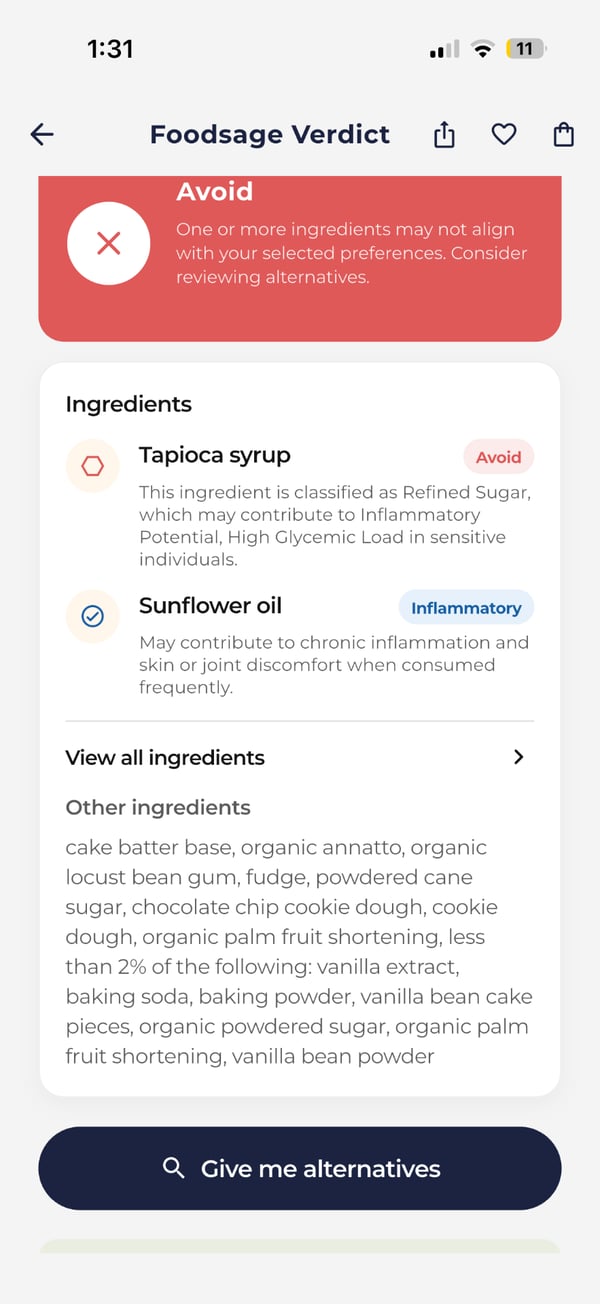
- Best for — people checking food products against food sensitivities tied to autoimmune and chronic conditions such as celiac disease, IBD, diabetes, Hashimoto's and PCOS, against food allergies, or against clean-eating goals such as a seed-oil-free or nitrate-free diet.
- Also useful — a clean-eating mode with options such as avoiding artificial additives, industrial seed oils, added sugars and nitrates and nitrites; lower-concern alternatives when a product does not fit; and personalized weekly meal plans.
- Keep in mind — it is food only (no cosmetics) and it does not diagnose or treat any condition. Foodsage is free to download, with in-app purchases that include a Premium subscription.
2. Fig: Long List of Diets and Allergens
Fig (from the company Food Is Good) lets you build a profile and then compares a scanned product's ingredients and allergen statement to it. According to Fig's own introduction, it supports 25+ dietary categories, including common allergens, intolerances, health conditions such as GERD, low FODMAP, low histamine and PCOS, and lifestyle diets such as vegan and paleo. You can also pick a store and see which products there likely match your profile.
- Best for — allergies, intolerances and specific diets, with ingredient-level handling of triggers.
- Keep in mind — it is free to download, but Fig lists a paid Fig+ plan, so check the store listing for what the free version includes.
3. Bobby Approved: Simple Approved-or-Not Check
Bobby Approved scans a barcode and shows whether the product is “Bobby Approved,” with harmful ingredients highlighted in red. Its App Store listing says it flags over 100 ingredients, including natural and artificial flavors, fake sugars, food dyes, chemical additives, inflammatory seed oils and preservatives, and lists it as a free download.
- Best for — shoppers who want a fast ingredient-quality check without setting up a profile.
- Keep in mind — its rules are the same for everyone, so it will not know your personal triggers, and the App Store listing is for iPhone.
4. Olive App: Scanner Plus Tracking
Olive App describes itself as a holistic health companion. According to its website it scans product labels, rates foods on a 0 to 100 scale and flags things like allergens, gluten-containing grains, dairy-derived ingredients, seed oils and additives, alongside food and trigger tracking.
- Best for — people who want scanning and tracking in one place.
- Keep in mind — it offers a free trial and then a subscription, and it states plainly that it is not a doctor and does not diagnose or treat conditions.
5. Open Food Facts: The Free, Open Database
Open Food Facts is a database of food products with ingredients, allergens and nutrition facts, run as a volunteer nonprofit and free to use. It shows the Nutri-Score nutrition grade, and its phone apps let you scan barcodes and upload photos of products and labels. Its site reports more than 4 million products from 150 countries.
- Best for — people who want a free, transparent, community-built resource.
- Keep in mind — the data is crowdsourced, so how complete an entry is depends on the contributors, and it is not set up to check a product against your personal profile.
6. Fooducate: Food Grades and Meal Tracking
Fooducate combines a barcode scanner with “Food Grades” and meal, snack, water and exercise tracking. According to its site it also offers diet customization (such as low-carb, vegan, paleo and keto), a free tier and a PRO plan with a 3-day free trial.
- Best for — people who want grades plus a food diary and habit tracking in one app.
- Keep in mind — its focus is overall food quality and nutrition, not checking against a personal list of triggers.
7. EWG Food Scores: Nutrition, Ingredients and Processing
EWG Food Scores, from the Environmental Working Group, rates products on a 1 to 10 scale (1 is best) across three areas: nutrition, ingredient concerns and processing. It is a searchable database of packaged foods.
- Best for — shoppers who want a rating that also looks at ingredient concerns and how processed a food is.
- Keep in mind — like Yuka, the rating is general, not matched to your own conditions or triggers.
How to Choose
- Ask what you need to know in the aisle — “Is this a decent food?” points to a general grade (Yuka, Fooducate, EWG). “Does this contain something I react to?” points to a personal-profile app (Foodsage, Fig).
- Check coverage — scan a few products you buy often. Any scanner can miss products or have out-of-date entries.
- Check the price model — several apps are free to download with paid plans, and trials end. Read the store listing before you subscribe.
- Combine tools — a general score for a fast read and a personal check for triggers works well. We make the same case for pairing Foodsage with the Monash FODMAP app.
Whatever You Use, Read the Label
No scanner replaces reading the ingredient list and any precautionary “may contain” statement yourself, particularly with celiac disease or a serious allergy, or the plan you have agreed with your clinician. For ingredient-level detail, see our guides to gluten as an ingredient and whether common foods are gluten-free.
Try Foodsage on Your Next Grocery Run
If a single score has never quite answered your question, try a scanner built around your own triggers. Learn more about Foodsage and download it for iOS or Android.
Continue reading
Foodsage compared
How Foodsage stacks up against other food scanner apps.
Bring inclusive wellness benefits to your team.
MetricPoint gives employers a modern, everyday wellness benefit employees actually use.
Request Demo